Thursday, October 22, 2009

Oracle DBA Views !

Ever wonder why some of those DBA_ views take so long to execute?
here is the view expansion of a query from SYS.DBA_ALL_TABLES joined to
SYS.DBA_OBJECTS

Simple huh?!

Designers Need Creativity, Understanding, Solutions


Two interesting links
1. Overtime working at Flickr during startup days probably was ineffectual:
2. Dan Pink on the surprising science of motivation: http://www.ted.com/talks/dan_pink_on_motivation.html

My takeaway point: the less routine the task the more detrimental bonus and incentives (and probably pressure) are to succeeding in the task.
Can't help but think about banking bonuses.

I also think about the "chinese army" approach to software like when Oracle put 600 developers on CRM and ended up canning it. It takes insight, passion, understanding and creativity to come up with good solutions. Designers who have little understanding for the problem/solution domain and/or lack of understanding the user experience will produce junk software. Even if those designers understand the domain and the users, if they don't have the breathing space to come up with creative and innovative solutions, again, what they produce will be run of the mill.

I think data visualization and monitoring is so sub par because it takes creative leaps which few people have the time or mind space to come up with. Many scripts on the other hand or much more straight forward - I want this set of data processed with this algorithm. In this case pressure and incentives can produce quick results where as pressure and incentives on a large user interface like OEM or CRM produce a lot of junk. It's really a question of charting new territory or not. If the work has a creative twist or something that's never been done, the pressure is not going to help. If the work is processing a well defined input with well defined output then pressure is going to work fine cranking it out. Some scritps are routine, some scripts have beautiful creative innovated leaps but UI design in general is lacking a rich set of design rules and when rules are applied it can get out of hand. For example we use to joke that the UI department at large company I recently worked at was full of UI Nazis because of there rabid application of detrimental UI rules pumping out interfaces that looked like 1992 Web designs. Design rules made significant headway thanks to Edward Tufte but I feel that Tufte only started to scratch the surface of domain of visualizing information. Information visualization is a domain that is ripe for huge innovation in this day and age of information overwhelm where the solutions depend not so much on the information but on how we process and communicate the information.

ashmasters.com

for all questions on the site ashmasters.com, please asked them in the comment section on this blog post. Due to the enormously high amount of spam on that site, I am no longer responding to the posts at ashmasters.com (yes there is filter software I can set up but till I do ... )

Wednesday, October 21, 2009

DB Optimizer

DB Optimizer makes powerful use of graphics to communicate data faster , clearer and with less effort by the user than text representations. (see http://sites.google.com/site/embtdbo/graphics-vs-text)

DB Optimizer has three key factors
  1. Provides clear tuning methodology
  2. Opens up communication between QA, DEV and DBAs
  3. Seamless integration of 4 major functionalities
1. Methodology:
  • profile database
  • identify bottlenecks
  • if bottleneck is a SQL, send to tuner
  • identify best execution path, proper indexes, correct SQL, correct schema definitioins
  • load test new sql verses old and profile to verify improvement
go to back to profiling and see if load is under the max CPU line. If not tune the next highest SQL.
Without a methodology we find people misdirected and often afflicted with "compulsive tuning disorder" (as my esteemed colleague Gaja put it).
  • Profiler identifies any performance issues and quantifies the magnitude.
  • Tuner identifes any issues with SQL
  • Load tester does a sanity check on the performance and tests concurrent users impact of SQL.
2. Communication
An under appreciated area of development is communication between teams such as development and DBAs. DBAs complain about bad coders, coders complain that the database is slow. Who is right? The answer is clear with DB Optimizer. DB Optimizer's profiler shows clearly whether the issue is a badly written SQL or a database configuration issue. If the problem is database configuration, the the developer can email the profiling session (a flat file containing an HSQL database of data) that the DBA can open and quickly identify and solve any database issues. If the the DBA find a bad SQL the DBA can send the saved profiling session to the developer indication the impact of the SQL on the system. The SQL can be quickly analyzed and tuned in the SQL tuner, and the developer can sanity check the new SQL by load testing it and comparing the load of the new SQL to the old SQL.
DB Optimizer is graphical and simple making communicaiton of issues between development, QA and DBAs efficient and clear.
If QA runs into a performance problem they can email the saved profile session to the DBA who can review the issues offline. The save profile session is interactive allowing the DBA to drill in on spikes and drill down on SQL, Sessions or Events to see exactly what the issues were on any time frame from 5 seconds up to hours wide.
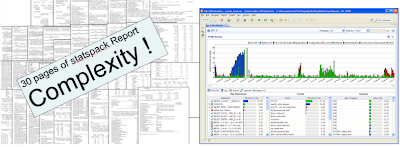
I've seen time spent on meetings go from hours over weeks to a single quick meeting to pin point clearly problem issues and allocate resources to address the issues. Without a clear presentation of the bottleneck and precise identification of the causes, meetings tend to become arguing matches. Once there is a clear view, thanks to DB Optimizers profiling page, the decisions on whether to configure the database, add more CPU, tune application SQL or change schema design become clear. Allocating resources to address these issues can be costly and thus the information used to makes these decisions has to be clear, reliable and understandable by all parties. Try showing a statspack report to a general audience and see the eyes glaze over. Now show a DB Optimizer profile report and everyone comes to attention and clearly the contents are understand and consensus is reached quickly. (see previous post on text verses graphics : http://db-optimizer.blogspot.com/2009/10/interesting-discussion-of-gui-verses.html )

3. Integration
DB Optimizer seamlessly integrates in a single product profiling, tuning, load testing and SQL IDE with datasource browser. No other product on the market fully integrates all this functionality. For example at Quest to have the same functionality you'd have to have Toad, Performance Analyzer , SQL Optimizer and Benchmark Factory. At Oracle you'd have to SQL Developer, Diagnostics Pack, SQL Tuning Pack and Real Application Testing (RAT) to the tune of $15,000 per CPU per database*. For example a 2 database each on a 4 CPU machine would be 2*4*15,000 or $120,000 for the Oracle solution, where as they would be $1500 for DB Optimizer!

*Oracle recently raised Diagnostics Pack and SQL Tuning Pack from $3000 to $5000 per CPU.
The price for Real Application Testing is unclear to me, but reports I've read put it on the same order as Diag and Tuning packs.
Of course OEM Diag, Tuning, and RAT do more than DB Optimizer but that also makes them harder to install, harder to use, more sluggish, less interactive and more difficult to manage resulting in a tool that one doesn't typically give to developers. Developers get left out of the benefits of load profiling, load testing and sql tuning with OEM packs and RAT but now with DB Optimizer, developers and QA, as we well as DBAs can have quick easy access to load profiling, load testing and SQL tuning.

Tuesday, October 20, 2009

Visual SQL Tuning (VST)

Visual SQL Tuning (VST) is a ground breaking technology that we are aggressively developing and improving every verison. In this first release of DB Optimizer with VST , version 2.0, we already benefit for quick visual identification of issues in the schema and SQL queries if they exist.

In the image below is an example of VST diagram in the top right. The table INVESTMENT lacks a join to the other tables and for every row returned from the main part of the query (CLIENT_TRANSACTION , BROKER, OFFICE_LOCATION) every row of INVESTMENT will be returned resulting in a Cartesian product. Clearly a problem in the query. (We provide possible re-writes solutions for this kind of problem under the “Overview”, not shown)

Below is an image of a more subtle cases that the VST clearly highlights where all the tables are joined but there is an implied Cartesian. As long as there are more than one row satisfying the join between the first join CLIENT and BROKER and second join BROKER and CLIENT_TRANSACTION we will again return Cartesian product of rows. This is clear in the diagram as the table BROKER has two details tables above it. Details are always above Master tables and there should only be at most one detail table above any Master tables. This could be a flaw in the query or a flaw in the schema design:

For example a well formed query would look like:

If Master Detail information is missing then the VST diagram will have many-to-many connectors:

This same set of data with properly defined unique indexes or primary key and foreign key definitions would look like:

And in fact the optimizer more consistently correctly optimizes the query when the schema definitions are well defined, and thus the query runs faster more consistently. On Oracle for example, the bottom query was always correctly optimized, where the one above without any unique indexes was incorrectly optimized in many cases

GUI forums and discussions?

Where are there good discussions on GUI and Information Visualization on the web?
Decent discussion group on web site of
Stephen Few:
Edward Tufte's
which I find rambling and overly excited about pet issues like PowerPoint and Spark lines - yawn
If you don't know Edward Tufte you should though. He is probably the most eloquent and impactful person in the realm of information visualization over the last 30 years. His first book is by far the best first book to read on the subject:

The Visual Display of Quantitative Information

"A timeless classic in how complex information should be presented graphically. The Strunk & White of visual design. Should occupy a place of honor--within arm's reach--of everyone attempting to understand or depict numerical data graphically. The design of the book is an exemplar of the principles it espouses: elegant typography and layout, and seamless integration of lucid text and perfectly chosen graphical examples. " - Amazon Review

Friday, October 16, 2009

Graphics vs Text

Interesting discussion of GUI verses Scripts on Jared Still's Blog
Here are some examples where I think GUIs are powerful:
above is statspack verses the graphic interface I designed in DB Optimizer.
http://sites.google.com/site/embtdbo/graphics-vs-text
GUIs have the potential to be more powerful than scripts hands down but it is a question of writing them in a way that they aggregate, organize and compact data to be understood and processed faster and more easily by the user.